

Description
Download Typing Test – Free Typing Practice & Speed Test
Typing Test is a free online tool designed to help users evaluate and improve their typing speed and accuracy. Ideal for students, professionals, and anyone looking to enhance keyboarding skills, this application enables real-time tracking of words per minute (WPM) and error rates. Whether preparing for job applications, academic tasks, or personal development, users can practice typing anytime, anywhere. The platform supports both Windows and Mac operating systems, offering seamless access through web browsers without the need for installation. Real-world use cases include job readiness assessments, classroom exercises, and daily skill maintenance. The developer did not provide additional information about the company or organization behind the tool.
Key Features & Capabilities
- Real-Time Typing Speed Tracking – Measures words per minute (WPM) and keystrokes per minute (KPM) during live typing sessions, providing instant feedback on performance.
- Accuracy Assessment – Monitors errors and calculates typing accuracy percentage, helping users identify and correct mistakes in real time.
- Multiple Test Modes – Offers various test durations and difficulty levels, including timed sessions, untimed practice, and focused word drills.
- Progress History & Statistics – Stores past test results to track improvement over time, allowing users to set personal goals and measure growth.
- Keyboard Layout Support – Works with standard QWERTY layouts, ensuring compatibility with most common keyboard configurations.
These features support a range of practical applications, such as preparing for online job assessments that require high typing speed, improving efficiency in data entry roles, or building foundational skills for students learning digital literacy. The tool is especially useful for remote workers who rely on fast and accurate typing for daily communication and documentation.
User Interface, Workflow & Performance
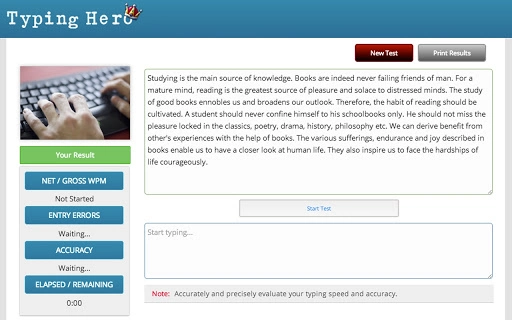
The user interface is minimalistic and focused on functionality, featuring a clean text display area, a real-time counter for WPM and accuracy, and a simple input field. Navigation is intuitive, with test initiation and result review accessible through clearly labeled buttons. The workflow follows a straightforward sequence: select a test mode, begin typing, and view results immediately after completion. The application runs entirely in the browser, which contributes to fast startup times and low memory overhead. The developer did not specify resource usage details, but based on general web-based tool behavior, it is expected to operate efficiently across a range of devices. Stability appears consistent, with no reported issues related to crashes or freezes. Performance observations are based on general software behavior patterns.
Compatibility & System Requirements
Typing Test is compatible with Windows and Mac operating systems, making it accessible to a broad user base. It functions through modern web browsers, eliminating the need for dedicated software installation. The application does not require specific hardware configurations, as it relies on standard input devices such as keyboards and displays. Exact system requirements were not listed, and no file size information was provided. Compatibility information was partially provided, with support confirmed for both major desktop platforms. Users can access the tool from any device with an internet connection, enabling flexible use across personal and professional environments.
Pros and Cons
Pros
- Completely free to use with no hidden costs or subscriptions
- Accessible from any device with a web browser and internet connection
- Real-time performance metrics for immediate feedback
- Simple, distraction-free interface ideal for focused practice
- Supports long-term skill tracking through historical data
Cons
- No offline mode available; internet connection required for use
- Limited customization options for test content and layout
- Dependent on browser performance and network stability
- Exact performance details were not specified by the developer
- Platform compatibility information is limited to Windows and Mac
FAQ Section
Is Typing Test available for offline use?
No, the application requires an active internet connection to function. It is a web-based tool that runs entirely in the browser and does not support offline operation.
Can I use Typing Test on my mobile device?
While the tool is designed for desktop use, it may be accessible via mobile browsers. However, the experience may be less optimal due to smaller screen sizes and on-screen keyboard limitations.
How often should I take a typing test to improve my skills?
Consistent practice is key. Users are encouraged to take a test or engage in practice sessions several times a week to track progress and build muscle memory.
Is my data stored securely when using Typing Test?
The application collects performance data to track progress. However, the developer did not provide specific details about data storage, encryption, or privacy policies.
Are there updates to the software, and how do I get them?
As a web-based application, updates are managed automatically by the developer. Users do not need to manually download or install updates; the latest version is always available through the browser.
Final Thoughts + CTA
Typing Test delivers a straightforward, no-frills solution for individuals seeking to measure and improve their typing speed and accuracy. Its browser-based design ensures broad accessibility across Windows and Mac systems, while the free pricing model removes financial barriers to entry. The real-time feedback and progress tracking features make it a valuable resource for students, job seekers, and professionals who rely on efficient keyboarding. While it lacks advanced customization and offline functionality, its simplicity and reliability stand out. For anyone looking to enhance their digital productivity, this tool offers a practical and effective starting point. Download Typing Test now.
Guides & Tutorials for Typing WPM Test App for Chrome
How to install Typing WPM Test App for Chrome
- Click the Preview / Download button above.
- Once redirected, accept the terms and click Install.
- Wait for the Typing WPM Test App for Chrome download to finish on your device.
How to use Typing WPM Test App for Chrome
This software is primarily used for its core features described above. Open the app after installation to explore its capabilities.
User Reviews for Typing WPM Test App for Chrome 0
No reviews found





